The Teacher Dashboard: Your Month at a Glance
The teacher dashboard: your roster split by quest activity, your monthly counts, Almost There, First Skill, and your students' recent wins.
Written By Dan
Last updated 29 days ago
This article is for Teachers. Owners and Admins see the studio-wide dashboard instead - see The Dashboard Home: Your Studio's Vital Signs.
Your dashboard answers one question: what did your teaching make visible this month?
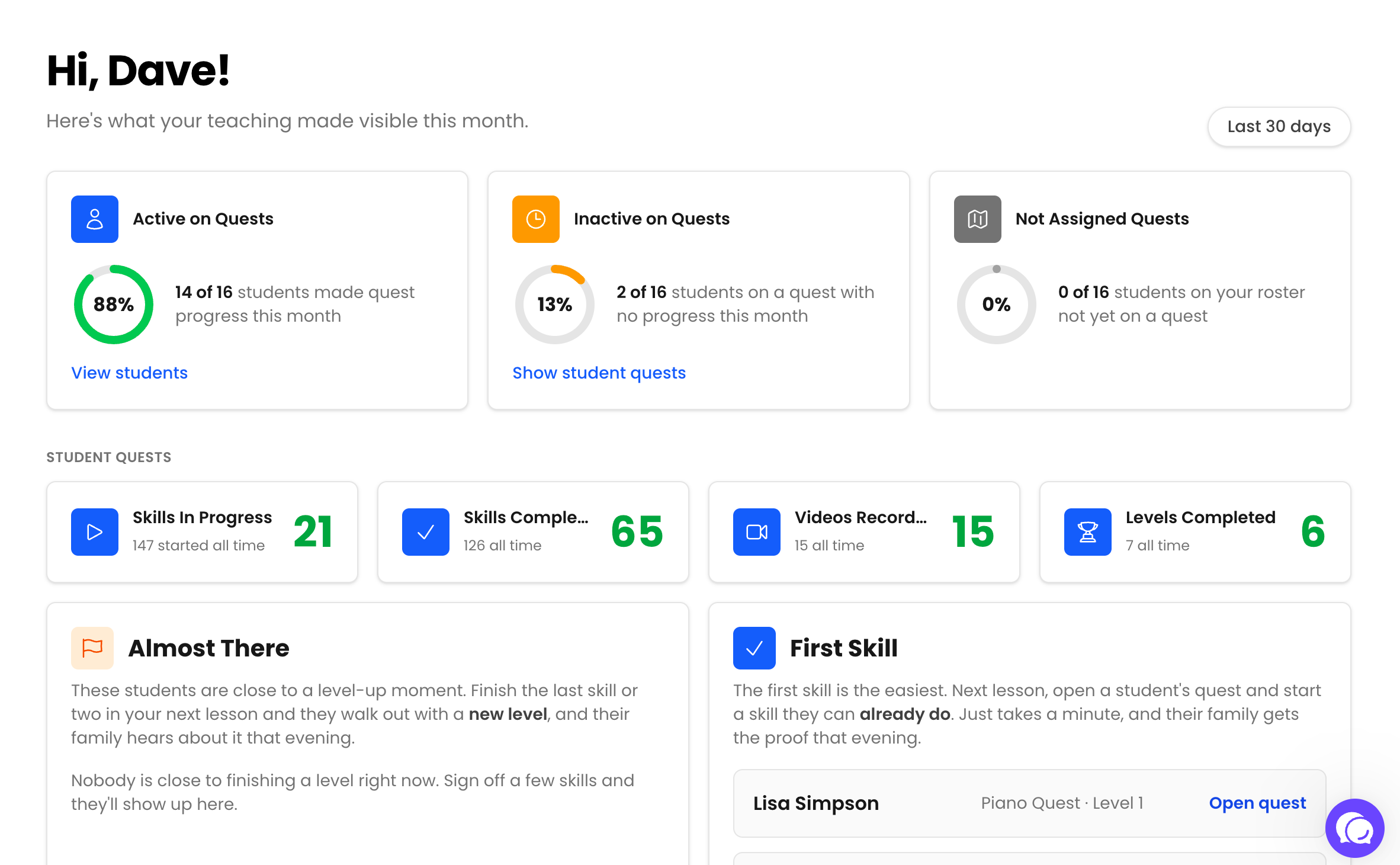
Everything on it covers your own students over the last 30 days, and every card links to the place where you can act.
Your roster, split three ways
Three tiles at the top divide your whole roster into shares that add up to 100%:
Active on Quests - students who made quest progress this month.
Inactive on Quests - students on a quest with no progress this month. The link filters your Student Quests list to exactly these, so you can plan next lessons around them.
Not Assigned Quests - students on your roster not yet on a quest. They get no progress tracking and their family gets no emails until you assign one.
Student Quest counts
Four tiles show your month's numbers, each with your all-time total underneath: Skills In Progress, Skills Completed, Videos Recorded, and Levels Completed.
Almost There
Students within a skill or two of finishing a Level. Finish the last skill in your next lesson and they walk out with a new Level - and their family hears about it that evening. Each row shows how many skills remain and links straight to the student's quest.
First Skill
Quests that have been assigned but haven't had a first skill started yet. The first skill is the easiest: open the quest next lesson and start something the student can already do. It takes a minute, and it's what sends the first proof home.
Quest Activity
A feed of your students' latest wins - skills completed, levels finished, videos recorded - each linking to the exact spot in the quest.
Sent to Your Families
Some schools also show teachers a Sent to Your Families block: the quest progress emails your completed skills triggered, so you can see exactly what landed in each family's inbox because of your teaching. This block is rolling out school by school, so you may not see it yet.
Why the 30-day window
A month is long enough to show real momentum and short enough that a stalled student stands out while there's still time to do something about it. The all-time totals under the count tiles keep the long view in sight.
Was this helpful?
Still need help? Ask the team